Key Takeaways:
You’re using live to fast track trust, and poor audio or video can undo that in seconds during your next product demo.
- Live creates immediacy, which accelerates credibility – but a single audio dropout or video freeze undoes that immediacy faster than any scripted talking point; picture a mic cutting out right when you reveal the price.
- People forgive fuzzy visuals more easily than muddled sound. A simple lavalier and basic room treatment often lifts perceived professionalism more than swapping to a high-end camera, so prioritize what your viewers actually notice first.
- A dependable technical plan protects the trust you worked to earn. PH Digimark’s live streaming setup targets those common failure points so your next launch doesn’t turn into a troubleshooting session – Book Your Strategy Call.
Why’s everyone and their mother going live these days?
Because live gives you a human moment – fast rapport, instant Q&A, and hands-on product proof that a polished post can’t match; you can build trust in minutes, while bad audio and video will erase that goodwill in seconds during your next product launch.
The magic of real-time connection with your fans
Live lets you answer questions on the spot, demo a feature up close, and react to comments so your audience feels heard; that immediacy directly boosts engagement and shortens the path from interest to purchase, like during a live Q&A after a demo.
Why people trust a face more than a corporate logo
Faces show tone, tiny expressions, and hands-on proof, so you come across as authentic and relatable; viewers judge your competence and warmth in seconds when you handle a product live.
When you capture those microcues clearly, trust follows – but only if your gear is up to the job: clear mic, steady framing, and accurate color. PH Digimark treats technical setup as a trust safeguard; see their live streaming setup and Book Your Strategy Call to run a quick pre-stream checklist or a short test run.
How “going live” actually cuts through the social media noise
Noise from recycled posts and ads makes live feel immediate and fresh; platforms and audiences notice that unpredictability, so a well-timed stream can surface while your people are browsing-ideal for a timed product drop.
Platforms favor streams that hook viewers fast, so you should plan a punchy title, a clear thumbnail, and a sharp audio mix; run a quick tech check and open with a strong hook in the first 30 seconds, paired with a tested preview clip to lift retention.
My take on why “good enough” isn’t actually good enough
You can’t expect viewers to forgive muffled sound or jittery video; when you go live, sloppy AV reads as careless, and that erodes the trust you were trying to build with the format.
The big difference between looking “authentic” and just looking messy
If you leave visible cables, a cluttered background, or inconsistent framing, viewers interpret authenticity as unpreparedness; controlled imperfections-like a natural gesture or lived-in set-feel human without undercutting your credibility.
Why your phone’s built-in mic is usually a big no-no
Most phone mics are omnidirectional and tiny, so they snag room echo, traffic, and keyboard clicks; when your voice lands thin or muffled, product demos and pitches lose their persuasive power.
Plugging in a lavalier, shotgun, or USB mic keeps your voice forward and reduces background noise; you should monitor levels with headphones, place the mic close to the mouth, and run a quick soundcheck-if you want help setting that up, consider a live streaming setup to remove the guesswork.
Factors that separate the real pros from the hobbyists
Pros rehearse, keep a backup internet source, and prioritize consistent audio and lighting so you don’t lose viewers when a glitch hits; those habits make you look reliable, not just lucky.
Consider the specific elements that keep streams professional:
- Reliable connection
- External microphone
- Consistent lighting
- Rehearsed flow
- Backup plan
This is exactly why investing in a proper live streaming setup protects your brand – Book Your Strategy Call.
What actually goes into a setup that won’t let you down
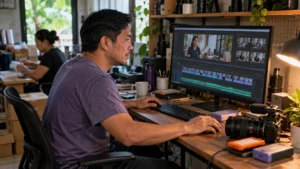
Think reliability first: your audience judges trust in seconds, so focus on predictable components – a good mic, a steady camera, soft lighting, and a solid connection you can count on during a sale or product demo.
Picking a camera that doesn’t make you look like a potato
Pick gear that nails exposure and eye-level framing; even a mid-range webcam or mirrorless on a tripod beats shaky phone footage. Prioritize true color and clean framing over headline specs you won’t use on a live sell.
Why your internet speed is your best friend or your worst enemy
Treat your connection like mission control – unstable Wi‑Fi kills trust. Prefer wired Ethernet for demos, and keep a cellular backup ready so a flaky ISP doesn’t derail a launch.
When you test, look for stability as much as raw numbers: bursty upload or packet loss shows up as freezes or audio gaps. Favor wired Ethernet and a dedicated router, set a simple QoS if you can, and keep a backup mobile hotspot or secondary network that you can flip to in under a minute; run a brief test stream from the actual room you’ll use so you catch interference or bandwidth throttling before customers do.
The gear you actually need vs. the flashy stuff you don’t
Forget toys that don’t move the needle-start with a clear mic, a steady camera, and soft lighting. Those importants protect your brand far more than an expensive switcher or cinema lens on day one.
Balance cost and function: a USB or XLR mic into a simple interface gives better audio than most built-in mics, and a compact LED panel plus a reflector beats fancy studio rigs for product shots. Capture cards matter only if you want DSLR quality; software switchers like OBS handle multi‑camera on a budget. If you’d rather hand the technical work to pros, check PH Digimark’s live streaming setup options and when you’re ready, Book Your Strategy Call to stop guessing and start selling with confidence.
Here’s how to get your audio sounding like a million bucks
Start by treating audio as a trust safeguard-quiet room, decent mic, and basic EQ will make your live selling feel professional; if you want expert help, check our live streaming setup service for a practical checklist.
My favorite tips for killing that annoying background noise
Try quick fixes like sealing doors, adding soft furnishings, and recording short takes in a clothes-filled closet so you can hear how much background noise drops during a rehearsal.
- Close windows and mute HVAC where possible.
- Use a foam windscreen or simple noise gate in software.
- Record a 20-30 second test to compare before and after.
Perceiving the cleaner result quickly convinces viewers that your trust is earned on the spot.
How to find the “sweet spot” for your microphone placement
Angle the mic slightly off-axis and try distances until plosives vanish-about 6-12 inches is a useful starting point to find the microphone placement sweet spot for demos.
Move the mic a little, record a short clip, and listen on headphones for sibilance, proximity boom, or room echo; stop adjusting when speech sounds natural and consistent across a 20-30 second test clip.
Why a cheap lapel mic is still a hundred times better than no mic
Cheap lapel mics usually outperform built-in phone mics for live selling-clip one near your collar to cut room echo and keep your hands free for product demos.
Clip the lapel mic about a hand’s width from your mouth, secure the cable to avoid rustle, prefer wired for stability, and if you want an audit of your setup, Book Your Strategy Call.

Seriously, stop making these common live-selling mistakes
Stop treating going live like a checkbox; bad audio and a pixelated stream erode trust faster than anything else. Your product might be brilliant, but muffled sound or frozen visuals make viewers bail before you get to the point.
Why ignoring the chat is a total mood killer for your viewers
When you ignore the chat, viewers feel unseen and momentum dies; that directly hurts conversions. Call people by name, answer quick questions, and cue moderators so small doubts don’t spread across the room.
The “um” and “uh” trap and how to escape it for good
Silence stuffed with ums and uhs chips away at your authority; swap them for a quiet breath, a sip, or a short bridge phrase and you sound composed instead of scrambling.
Practice with a one-line outline rather than a full script so you stop hunting for words; swap fillers for set phrases like “Good question” or “Short answer,” record a few practice runs, and mark where you reach for a filler-then replace that moment with a scripted bridge.
Forgetting to tell people where to actually buy your stuff
Always tell people exactly where to buy-pin a clickable link, repeat the CTA on-screen, and say the checkout steps plainly so viewers don’t have to hunt for the cart.
Pin the chat link, add an on-screen buy button, and announce a simple path: cart, coupon, checkout. If your DIY setup keeps tripping over audio or frames, consider a technical fix-PH Digimark offers a live streaming setup that treats tech as a trust safeguard. Click Book Your Strategy Call to get one in place.
How to prep your “stage” so you’re ready for anything
Set up a compact workflow: mic within arm’s reach, a tidy backdrop, and a single laptop with your streaming app pre-configured so you can focus on the pitch, not the tech. That small investment protects your trust with viewers and keeps the sale moving on a clean, confident note like a small logo sign behind you.
Dealing with the messy clutter sitting right behind you
Tidy visible clutter-open boxes, clothes, and chaotic shelves pull attention away from product demos and chip at trust. Choose a plain wall, a simple fabric backdrop, or a branded banner, and place one tidy prop like a product or logo to anchor the view during close-ups.
Testing your tech before that “Go Live” button glows red
Run a full dress rehearsal to confirm mic levels, camera framing, and that the stream actually records locally; those checks mean you can recover video if the platform hiccups and keep product footage intact with a local backup recording.
Practice on the gear you’ll use in the real event: test mic position and pop-filter distance, lock white balance, and verify encoder settings in your streaming app. Check both wired Ethernet and a phone hotspot, record a local copy, and clap once on camera to verify audio sync. If you want a ready-made checklist, PH Digimark offers a tailored live streaming setup and can map a pre-launch run sheet for your team.
Having a solid “Plan B” for when the Wi-Fi inevitably acts up
Pack a charged phone with tethering enabled, a portable hotspot, and a short pre-recorded fallback demo so you can switch on the fly and keep the sale going during a live demo-those three items defend your audience trust.
Prepare for cutover by keeping a second device already logged into the platform, a lower-bitrate scene preset for constrained connections, and a clearly labeled USB tethering cable in your kit. Train one person on the exact switch steps and test the swap during rehearsal until it’s quick and predictable. Book Your Strategy Call if you’d rather have someone put the Plan B checklist and dry-run schedule in place for you.
Some burning questions you’re probably asking right now
Wondering whether tech really makes a difference? For brands doing live selling or product launches, poor audio and video undo trust faster than any pitch – and that’s avoidable; explore a live streaming setup that treats tech as a trust safeguard.
Do I really need to spend a ton of money to get started?
No, you don’t. Small, targeted upgrades like a decent microphone and a softbox often beat an expensive camera for perceived professionalism – think a USB condenser mic and a softbox.
What happens if nobody actually shows up to watch me?
If no one turns up, the real cost is lost momentum: missed practice, weak social proof, and harder audience-building next time, so you should have a fallback plan like recording or inviting a guest host.
Instead of scrapping the stream, repurpose the recording into short clips, post a highlight reel, run a follow-up email to attendees and absentees, or partner with a micro-influencer to seed proof – a mid-sized DTC brand can turn one empty live into ongoing content.
How often should I be going live to see actual results?
Aim for a regular schedule you can stick to rather than sporadic spikes; predictable cadence – weekly or biweekly for many teams – helps viewers build habit and gives you measurable signals like lead captures or product demos completed.
Consistency lets you test one day and time for several weeks, rotate three content pillars (education, demo, Q&A), and track what converts; if your setup is shaky, a reliable live streaming setup stops technical failures – Book Your Strategy Call.
My honest advice on where to go from here
Start small: pick one format and one consistent slot, and treat tech as the trust safeguard it is for your buyers. If DIY feels risky, check PH Digimark’s live streaming setup. Book Your Strategy Call.
Choosing the right platform that fits your specific vibe
Pick a platform that matches where your buyers already hang out-social commerce for fast product drops, a webinar tool for longer demos. Look for stable recording, chat moderation, and clear monetization options; poor audio or choppy video will erode trust, so pick what suits a direct-to-consumer Instagram Live or a B2B Zoom webinar.
Building a streaming schedule you can actually stick to
Commit to a cadence you can prep for-weekly or biweekly, same day and time-so your audience learns to expect you; consistency beats one-off spectacle, for example a weekly 30-minute demo that becomes appointment viewing.
Plan rehearsal blocks, batch visuals and captions, and slot a 10-minute tech test right before going live; record locally or run a backup stream to avoid total loss. For a mid-sized ecommerce brand you might do a two-hour prep day, queue three canned responses for chat, and have a producer on call.
How to look back at your old footage without totally cringing
Reframe past streams as feedback: timestamp glitches, note what held attention, and mark three fixable things to fix-audio hiss, shaky framing, or a rambling intro-so you improve without getting stuck in perfectionism.
Use playback speed and chapter markers to skip fluff, compare viewer drop-off with moments of sloppy audio, and make a rolling action list: swap the mic, tighten the opener, or trim the first 45 seconds. Then repurpose a polished highlight clip for social.
Why showing up consistently is the real game-changer
Showing up every week builds familiarity faster than a polished one-off; people judge you by patterns, not promises. When you create a predictable cadence, trust compounds, and you catch AV slip-ups before they cost conversions – because the format only looks credible when your execution matches it.
Building a community that actually waits for your streams
Community members mark time around what you do when you give them clear signals: a fixed schedule, short promos, and an obvious reason to tune in live. Offer an exclusive perk or a quick Q&A for attendees and you’ll train viewers to treat your stream like an appointment rather than random noise.
How to get better by just doing it over and over again
Practice turns technical chaos into routine: you learn which mic settings clutter speech and which angles hide product flaws, so you stop improvising fixes mid-stream and start delivering confidence. Do small, repeatable runs and you’ll notice clearer audio and steadier camera work within just a few sessions.
Track basic metrics and hard facts after each session: save recordings, timestamp where viewers drop or comment, and keep a simple pre-stream checklist (mic levels, lighting, backup feed, product placement). Try one technical tweak per week and review results. If you prefer expert help, PH Digimark offers a live streaming setup to make fixes faster. Book Your Strategy Call.
The long-term payoff of not quitting after your first week
Rewards for persistence show up beyond a single stream: repeat viewers become advocates, launches scale more smoothly, and you spend less energy apologizing for glitches. Sticking with a schedule turns live sessions into a dependable sales and trust channel.
Over months you’ll map what formats sell, which time slots catch repeat buyers, and what technical changes actually cut churn. Log issues, prioritize fixes, and your setup becomes a trust safeguard instead of a gamble – and that’s how small weekly wins compound into real business momentum.
Final Words
You want viewers to trust you the moment you go live, but bad AV undermining live trust faster than anything else. If you’re after reliability, check our live streaming setup. It’s the technical handshake that keeps folks watching – Book Your Strategy Call.
FAQ
Q: Why does bad audio and video undo trust so fast when you’re live?
A: You expect presence and clarity from a live stream, and your viewers expect the same. When sound is muffled or the picture jitters, people don’t just notice-they reassess whether you’re prepared or whether your product is worth their time. Poor audio makes you hard to follow; poor video hides product details and facial cues that build rapport. A fading mic, echo, or blown-out lighting sends a quick, silent message: this wasn’t tested, or it wasn’t worth the effort. That alone can cost attention, questions, and sales.
Q: What are the most common AV mistakes that kill credibility during a live selling session?
A: You can trip over small things that look huge on-camera: wrong mic placement that adds room echo, heavy compression that smears speech, backlighting that turns you into a silhouette, and shaky framing that distracts from the product. Dead-simple errors show up too-muted inputs, wrong camera selected, or streaming at a resolution the platform can’t handle. Test clips will reveal whether colors wash out, whether a product texture disappears, and whether your voice cuts in and out. Catching those problems in a quick rehearsal saves you from losing trust mid-event.
Q: How should you test your setup so issues don’t surface live and embarrass everyone?
A: You can run a private or unlisted test stream exactly like a real show: same platform, same title, same opening lines. Record a two-minute segment and play it back on a different device to check sync, clipping, and color. Ask a colleague to join from a separate network and report latency, dropouts, and audio levels. Keep a simple checklist-camera selected, mic levels, lighting angle, ethernet connected-and tick it off out loud so nobody misses a step. Do one dress rehearsal with a friend pretending to be an actual buyer; that one rehearsal often uncovers the odd little thing that would have gone viral for the wrong reasons.
Q: What’s the minimal gear and settings that actually protect your reputation without breaking the bank?
A: You don’t need an OB truck, but you do need reliable necessarys: a decent directional mic or lavalier to keep voices clear, a stable camera on a tripod or a steady phone mount, and a front-facing soft light to avoid harsh shadows. Prefer wired internet when possible; a phone hotspot as a backup can save a stream if the main connection hiccups. Set your stream resolution to match the platform’s recommendations and avoid ultra-high bitrates that your upload can’t sustain. Many brands find that a solid USB mic, a mid-range camera, and a small softbox produce far better results than fancy gear that’s misconfigured.
Q: How can PH Digimark help, and what should you do next?
A: You can treat setup like a checklist or you can treat it like the trust safeguard it really is. PH Digimark offers a dedicated live streaming setup service that focuses on reliable signal, clear audio, and lighting that shows product detail. The team runs site or remote audits, configures gear, performs test streams on your target platforms, and hands you a practical runbook for every show. Book Your Strategy Call to pin down the things that make your next stream look practiced rather than patched together.